
DataWeave is a new language for querying and transforming data. DataWeave includes a connectivity layer and engine that is fundamentally different from other transformation technologies. It contains a data access layer that indexes content and accesses the binary directly, without costly conversions, enabling larger than memory payloads, random access to input documents and very high performance.
We have taken a simple file transformation and set off data as an example that is to be transformed from JSON to XML.
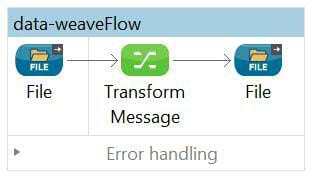
The flow below shows the file to file transformation and mapping created for showcasing the DataWeave. The transformation component is called ‘Transform Message’, when we look at the component pallet in Anypoint Studio. We will not see any component as DataWeave.
When the transform message component is selected, we can see the properties as shown below.
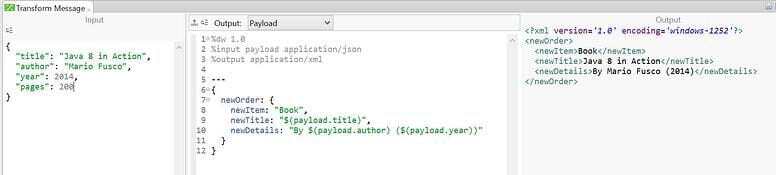
The above image shows three sections, the first one is an input section which shows the message section and what is available for transformation. The second section is the DataWeave code and the third one output section that shows us the preview of the transformation in the expected output format.
DataWeave code is a JSON like syntax and is format neutral. This is used to define the mappings. The top section defines the output, variables and the expected structure. Under that, we have the code after the three hyphens. These three hyphens are expected by the DataWeave engine to understand where the transformation actually starts.
The output section is instantly updated and we can see the updates as we are making the changes to the mapping in the code section.
In the above example we have use the output type ‘application/xml’, as defined in the top section in the code, so our output is in XML format. The format for output can be changed to csv or java by just changing the output type to ‘application/csv’. The change can also be observed in the output section as shown below.
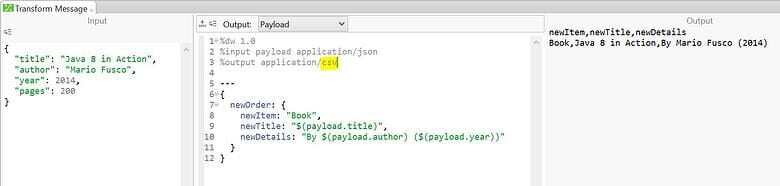
or to ‘application/java’ as shown below.
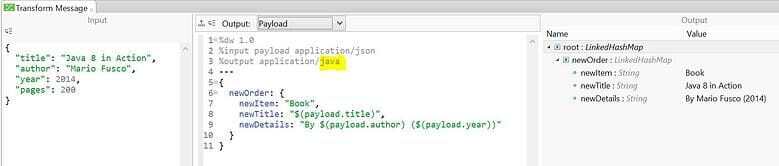
The DataWeave language has lot of operators like functions, operators, filters, etc. built into it to help with most of the common transformations. It also supports a variety of transformations, from simple one-to-one mappings to more elaborate mappings including normalization, grouping, joins, deduplication and pivoting. It also supports XML, JSON, CSV, Java and EDI out of the box. The comprehensive reference documentation is available for full list.
NOTE: currently, reading larger than memory XML is not yet supported.
Overall DataWeave makes the transformations easy to develop. It also isolates the input and the output types, which can be changed even after creation of the transformation provided the formatting and element mappings remain the same. The DataWeave universal language for data access can not only be used for transformation, but also for querying data throughout your flow. Using the dw() function, we can quickly query data and use it to log information from payloads, route data, or extract it for message enrichment.
If you would like to find out more about how Systems Integration could help you make the most out of your current infrastructure while enabling you to open your digital horizons, do give us a call at +44 (0)203 475 7980 or email us at Salesforce@coforge.com
Other useful links
5 + 1 must have technologies for eCommerce success
EDI to API – The evolution of systems integration, Part 1
Key Takeaways
- DataWeave is a powerful, format neutral language designed for querying and transforming data across formats like XML, JSON, CSV, Java, and EDI.
- Its architecture enables binarylevel data access, eliminating costly conversions and allowing random access to large payloads.
- Transformations are executed using the "Transform Message" component in Anypoint Studio, where input, mapping code, and output preview are clearly separated.
- Output formats can be switched (XML, CSV, Java) simply by updating the output type declaration at the top of the DataWeave script.
- DataWeave supports a wide range of complex operations including grouping, joins, normalization, pivoting, and deduplication.
- Developers can use the dw() function not only for transformations but also for querying, logging, routing, and message enrichment.
Why This Matters
DataWeave simplifies the process of integrating and transforming data across heterogeneous systems, enabling faster development, cleaner code, and easier maintenance—critical factors in modern digital integration scenarios.
Frequently Asked Questions (FAQ)
Q1. What is DataWeave?
DataWeave is a language used to transform and query data across a variety of formats in MuleSoft's Anypoint Platform.
Q2. Where is DataWeave used in Anypoint Studio?
It is used inside the Transform Message component, where you map inputs to outputs using DataWeave code.
Q3. Does DataWeave support multiple output formats?
Yes. You can generate XML, JSON, CSV, Java, and EDI formats simply by changing the declared output type.
Q4. What makes DataWeave different from traditional transformation technologies?
It directly indexes and accesses the binary content of inputs, providing high performance, low overhead, and support for large payloads.
Q5. Can DataWeave be used for querying, not just transformation?
Yes. Using the dw() function, developers can extract and log information, route messages, or enrich payloads.
Glossary of Terms
Transform Message
A MuleSoft component where DataWeave scripts are authored and executed.
DataWeave Script Structure
Consists of an output declaration, variables, structure definitions, and executable mapping code starting after ---.
Output Type
Defines the final data format (e.g., XML, CSV, Java).
Normalization
Transforming data into a structured, consistent form.
Pivoting
Reorganizing data dimensions to create new perspectives or insights.
Best Practices for Using DataWeave
- Always define the output format clearly at the top of your script.
- Use builtin functions and operators to simplify complex mapping logic.
- Preview transformations frequently using the real-time output panel.
- Keep transformations modular—use variables and reusable mapping functions.
- Avoid unnecessary conversions to improve performance.
- Test transformations across different input payload sizes, especially large data.
Common Pitfalls & How to Avoid Them
Pitfall: Writing all mapping logic inline
Solution: Use variables and reusable components for readability and maintainability.
Pitfall: Forgetting the required --- separator
Solution: Always place executable DataWeave code after the three hyphens.
Pitfall: Assuming DataWeave supports large XML reading
Solution: Be aware that large XML input is not yet supported.
Pitfall: Hardcoding output formats
Solution: Leverage DataWeave’s output declaration instead of manually constructing formats.

Related reads



About Coforge
We are a global digital services and solutions provider, who leverage emerging technologies and deep domain expertise to deliver real-world business impact for our clients. A focus on very select industries, a detailed understanding of the underlying processes of those industries, and partnerships with leading platforms provide us with a distinct perspective. We lead with our product engineering approach and leverage Cloud, Data, Integration, and Automation technologies to transform client businesses into intelligent, high-growth enterprises. Our proprietary platforms power critical business processes across our core verticals. We are located in 23 countries with 30 delivery centers across nine countries.